How to reply customer complaint: a 4-step flow for refund requests
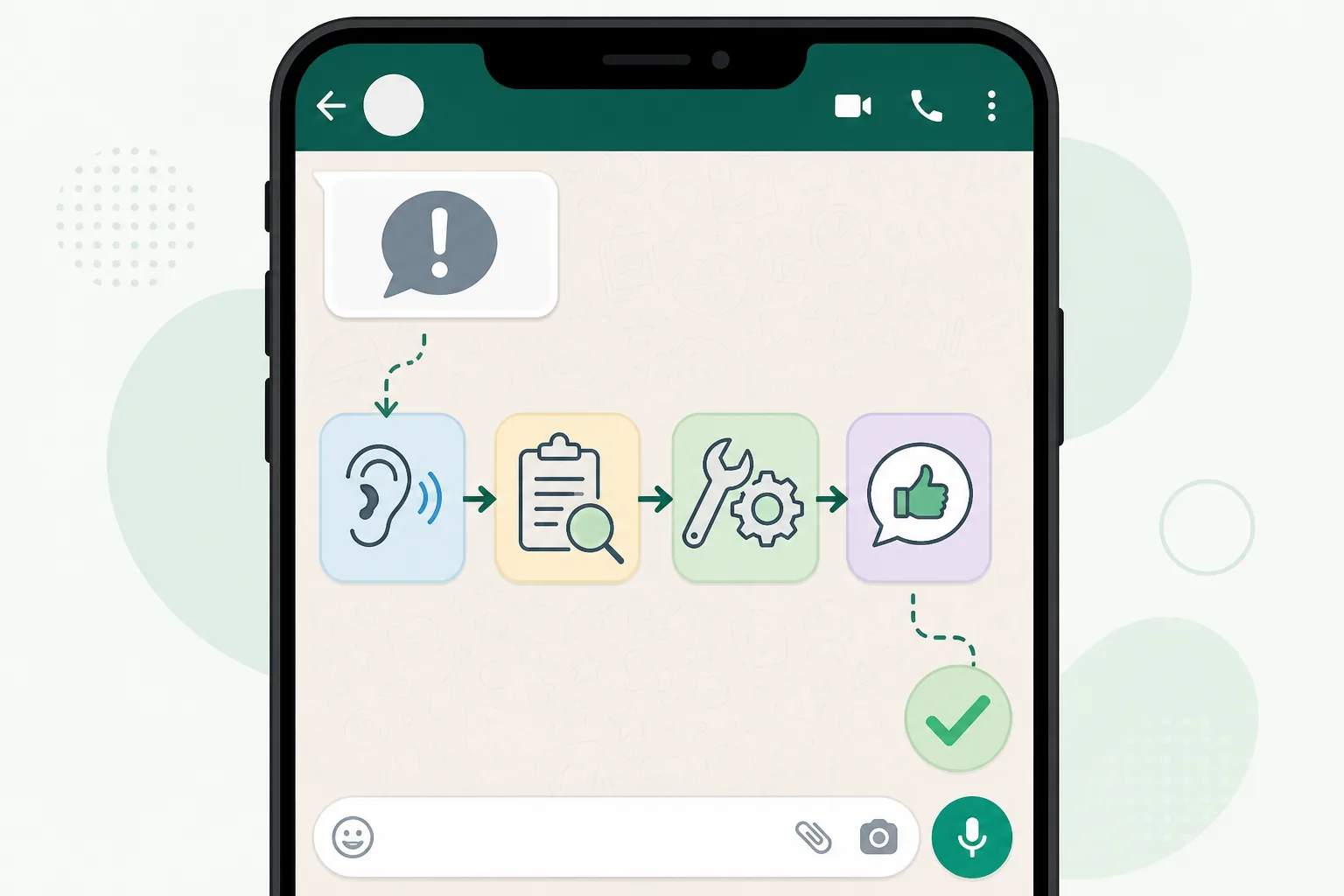







To reply to a customer complaint that ends in a refund request, follow four steps: acknowledge, understand, offer a clear solution, then confirm and close. Doing this fast and in the right order keeps the customer. DREAMZTRACK AI follows the same stages, because it knows where the customer is in the conversation.
See it in action
Why refund requests need a flow, not a template
A refund request is rarely about money alone. The customer is upset, waiting, and watching how fast you answer. If you reply with one copy-paste line, they feel ignored and the complaint grows.
Many Malaysian SMEs handle this on WhatsApp: a cafe with a wrong order, an online shop with a damaged parcel, a tuition centre with a fee dispute. The messages come at night and on weekends, when nobody is watching the phone.
So how to reply customer complaint messages well comes down to one idea: answer according to the stage the customer is at. Someone who just complained needs listening. Someone who sent a photo needs checking. Someone who heard your offer needs a clear next step.
A keyword robot cannot tell these apart. It sees the word "refund" and fires the same reply every time. That is how a small problem becomes a bad review.
The 4-step flow for a refund request
Use this order every time. It works whether you type the reply yourself or let AI do it.

- Acknowledge. Say sorry for the problem and say you are looking into it. Do not argue yet.
- Understand. Ask for the order number, a photo or a short description. One question at a time.
- Offer a solution. State what you can do: refund, replacement, exchange or credit, and how long it takes.
- Confirm and close. Repeat what was agreed, thank them, and check they are happy.
Sample wording for each step
Step 1: "Hi Kak Aina, sorry about this. We are checking your order now."
Step 2: "Can you send a photo of the item and your order number?"
Step 3: "Thanks. We can refund to your account within the days stated in our policy, or send a replacement today. Which do you prefer?"
Step 4: "Done, your refund request is logged. Thank you for your patience."
For more ready wording, see our guide on WhatsApp Business message wording in BM and English.
Where most replies go wrong
Most businesses do not lose the customer because of the refund. They lose them because of how the reply felt.

Notice that every point is about stage and memory, not about wording. The fix is a system that remembers the conversation.
How AI Reply runs the flow inside DREAMZTRACK
DREAMZTRACK AI Reply reads the whole conversation and knows which stage the customer is at. It is not a keyword robot. This is what makes the four steps work without you watching the phone. You can see the feature on the AI Reply product page.
What you set up, and what happens
- You tell the AI your refund policy, your tone and what it may offer, in plain words.
- A customer sends a complaint on WhatsApp, even at midnight.
- The AI acknowledges at once, then asks only for what is still missing.
- When the customer replies with a photo or order detail, it moves to the solution step instead of repeating itself.
- It confirms what was agreed so the customer knows what happens next.
This is AI reply customer message handling that follows the conversation, not a fixed script. If you want to change the instructions later, Text AI Edit Instruction lets you just type the change, with no back office needed.
Auto reply vs AI reply for complaints
Many owners start with a basic WhatsApp auto reply. It is fine for "we are closed", but weak for complaints. Here is the difference.
| Situation | Fixed auto reply | DREAMZTRACK AI Reply |
|---|---|---|
| Customer says "refund" | Sends one policy message | Checks the stage, then answers |
| Customer sends photo | No understanding | Moves to the solution step |
| Customer asks again | Repeats same text | Remembers earlier messages |
| Night or weekend | One "we will reply soon" | Replies and progresses the case |
| Tone | Cold and fixed | Follows your set tone |
If you are comparing tools, read the limits of free WhatsApp autoresponders and how to move from a fixed greeting to AI that replies by stage.
When a human should step in
AI handles the routine well: a wrong item, a late parcel, a simple refund within policy. Some cases need a person, such as a large amount, an angry customer who asks for the owner, or a health or safety issue.
The best setup is a team effort. The AI does steps one and two fast, collects the facts, and your staff only join for the hard decision. That saves your team from typing the same questions all day.
We cover this in detail in when to hand over a complaint to a human. For the bigger choice, see WhatsApp chatbot vs live agent.
Turn a refund into a kept customer
A well-handled complaint can make a customer more loyal than before. After the refund or replacement, the conversation is not over.
Fewer repeated complaints also means better sales from the leads you already pay for. Read what to fix before spending on more leads.
Over 1600 businesses already use DREAMZTRACK AI. Start using AI Reply on your WhatsApp today, or ask for a demo and we will show the refund flow with your own policy.
Frequently Asked Questions
What should I say when a customer asks for the price?
Give the relevant price information clearly, along with any details that affect the total. If you need more information to answer accurately, ask one focused question before recommending an option.
How soon should I reply to a customer?
Reply as soon as your team reasonably can, especially when the customer is asking about an active order or booking. If you cannot answer yet, acknowledge the message and explain that you will check the details.
Does a WhatsApp auto reply help customers buy?
It can acknowledge a message and point customers to a useful next step, but a generic response may not answer what they need. Use automation for simple first responses and provide a relevant human reply when the question needs context.
How do I follow up without sounding pushy?
Send a brief, polite check-in that refers to the customer’s question and offers help. Avoid repeated messages, and make it comfortable for them to continue later or decline.
Which plan is right for you?
Pick the one that matches how you work. You can start today and change later.
Pro
For one person running sales alone
AI Salesman
RM 499 per month
Subscribe nowBest if: You get many WhatsApp enquiries and want an AI to answer and follow up for you.
Business
For teams of 3 or more
3in1 Dreamztrack AI
Best if: You want AI replies, bulk messages and ad insights in one plan.
Enterprise
Made around your business
Custom
Talk to usYou have many staff, need a custom setup, or want it to fit your own way of working. Tell us what you need and we shape the plan with you.
Not sure which one? Chat with us on WhatsApp. Chat on WhatsApp
Ready to start?
Pick a plan and start today, or chat with us on WhatsApp first.
Get a free demo on WhatsApp
Leave your WhatsApp number and we will show you how it works for your business.
- See it with your own business
- Ask anything about the setup
- We reply on WhatsApp
Prefer to chat now? Chat on WhatsApp
More ways to grow your WhatsApp sales
🖼️ AI Keyword Reply
When a customer mentions a keyword, it sends a voice note, photo or video automatically.
See how it works🛍️ Product AI
Add your products; it recommends and quotes automatically (up to about 500 products).
See how it works✍️ Text AI Edit Instruction
Change or improve the AI's instructions just by typing, no back office needed.
See how it works